
Account
Sagar Club Forgot Password – reset in a minute
Back in within a minute.
Updated 20 October 2026
In this article 7
Forgot your password? If your registered SIM is in your phone, you’ll be back in within a minute.
Resetting your password
- On the login screen, tap Forgot password.
- Enter the mobile number on your account.
- Type the code we text you.
- Choose a new password and confirm it.
- Log in straight away to make sure it works.
Choosing one you’ll remember
Three unrelated words and a number — mango-river-lamp-42 — is easier to remember and harder to guess than a short jumble of symbols. Save it in your phone’s password manager and you won’t need this page again.
Code not arriving?
See OTP not received — it’s almost always DND, a full inbox or a weak signal.
After resetting
- You’ll be logged out on other devices — log in again where you need to.
- Save the new password in your phone’s password manager.
- If you didn’t request the reset, change your password again and tell support.
Back to Sagar Club.
Back to Sagar Club
Create your free Sagar Club account and start playing in minutes. 18+ only.
The reset-password screen
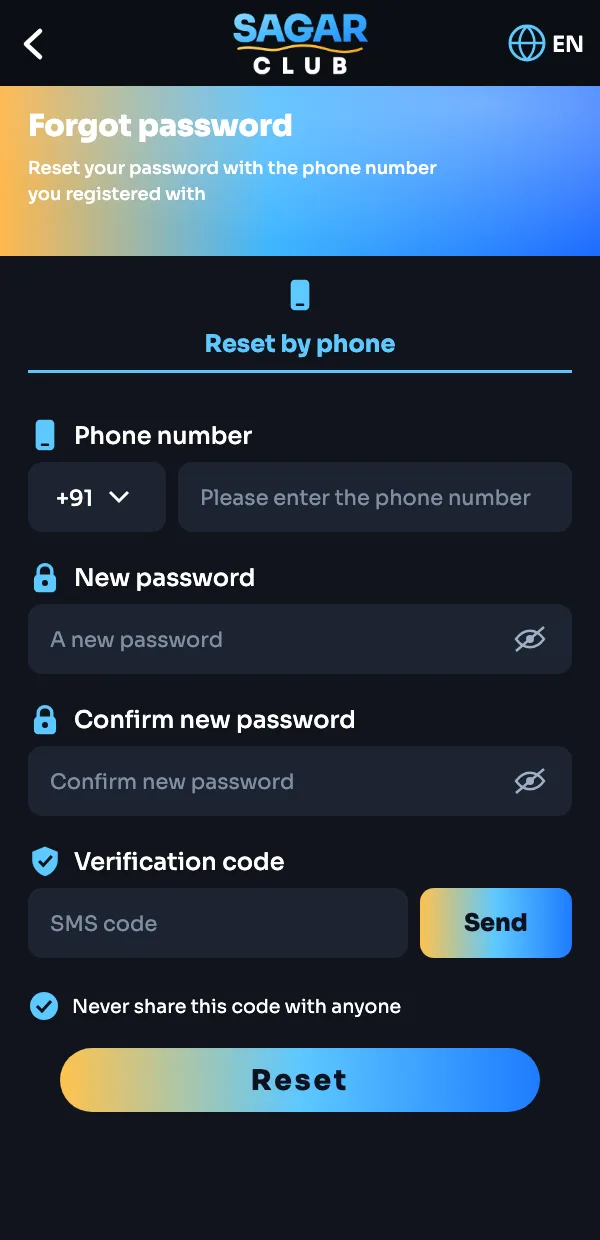
- On the login screen tap Forgot password.
- Enter the phone number you registered with.
- Type a new password twice.
- Tap Send and enter the SMS verification code.
- Tap Reset and log in with the new password.
The SMS code is only for you. Sagar Club support will never ask for it.
Frequently asked questions
How do I reset my Sagar Club password?
Tap Forgot password on the login screen, enter your number, type the SMS code and choose a new password.
I no longer have that SIM.
Ask your mobile operator for a replacement SIM on the same number. If that’s impossible, contact support with as much account detail as you can.
More on Sagar Club
Was this page helpful?