

Invite
Sagar Club Invite – play with friends
Better with people you know.
Updated 20 October 2026

In this article 7
Games are better with people you know. Share your invite link, and when friends join you can see each other on the leaderboard.
Inviting
- Open Invite in the app.
- Copy your link.
- Send it to friends who’d enjoy it.
- They sign up through the link.
Be fair about it
- Invite people who want to play, not everyone in your contacts.
- Don’t post your link in unrelated groups.
- Second accounts for yourself aren’t allowed.
Helping friends get started
- Send them the download page along with your link.
- Show them how to play.
- Suggest they join the Telegram channel for event times.
Why play with friends
Seeing a friend two places above you on the leaderboard is the best motivation there is. Invite people who’ll enjoy it and you’ll have someone to compare notes with after every event.
Back to Sagar Club.
Play Sagar Club free
Create your free Sagar Club account and start playing in minutes. 18+ only.
The Invite & Earn screen
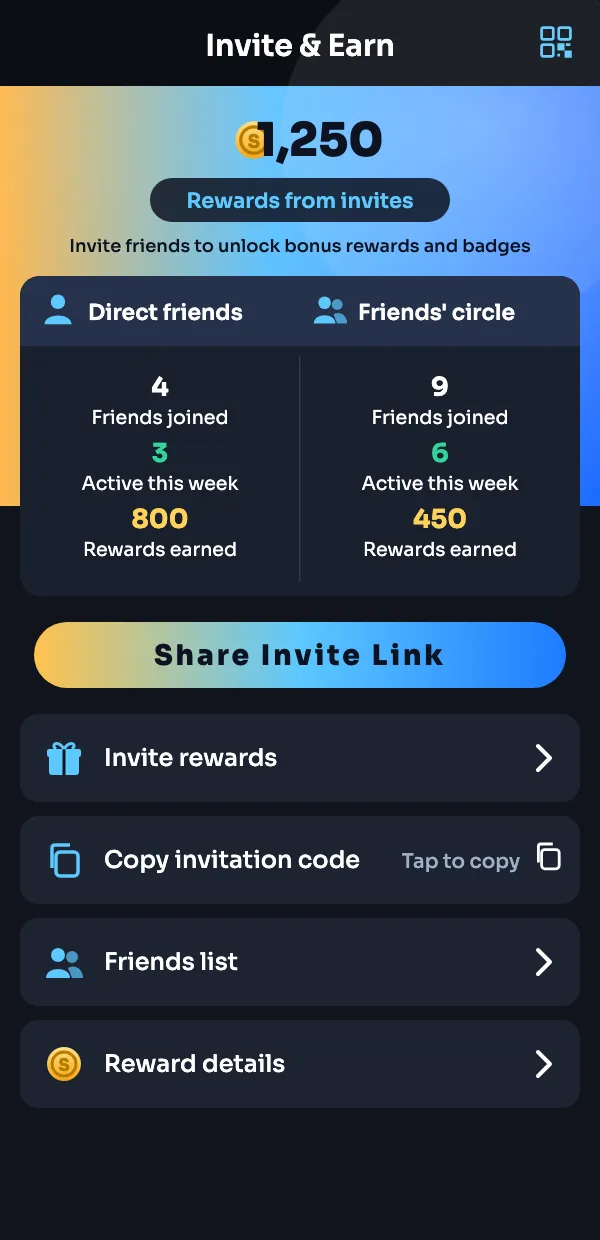
| On screen | Meaning |
|---|---|
| Rewards from invites | Total rewards unlocked through friends |
| Direct friends | People who registered with your own code |
| Friends’ circle | Friends your friends invited |
| Active this week | Friends who played in the last 7 days |
| Share Invite Link | Opens WhatsApp / Telegram share |
| Copy invitation code | Copies your personal code |
| Invite rewards | What each milestone unlocks |
| Reward details | A full log of invite rewards |
Frequently asked questions
How do I invite friends?
Open the Invite section in the app and share your link.
Can I invite myself with a second account?
No — one account per person.
More on Sagar Club
Was this page helpful?